The issue, as reported
Reports on both the Claude Code and Codex trackers describe the same thing: the limit lands mid-task, and whatever picks the work up next, whether the same tool after the reset or the other tool you pay for, starts cold.
- A Codex issue from September sets out the cost. After each usage-limit interruption, a large part of the new allowance goes on rereading repository files, rerunning checks and tests, and working out again which steps are finished. The reporter keeps handoff summaries by hand so Codex doesn't redo completed work, and asks for a checkpoint: completed steps, pending steps, modified files, the latest test results, blockers and the exact next action.
- A Codex feature request from July, with 12 thumbs-up, asks for the session to pause at the limit and carry on at the reset without having to restart it or re-explain what it was doing.
- The same request on the Claude Code tracker puts numbers on it: about 70 of 90 workflow tasks were done when the limit hit, and after resuming the progress showed 46, so roughly 24 finished tasks were thrown away and run again.
- Claude Code now continues on its own after the reset, but a September report says that covers the main conversation only: subagents and workflows running at the time fail, and the continuation builds on the half-finished run.
- Switching tools has its own version of the cold start. The Hacker News thread on Claude Code reading
AGENTS.md(740 points, 285 comments) drew a run of replies from people glad to delete the symlinks and sync scripts they had kept so every tool got the same rules.
Reported in
- Recovery after the limit eats the new allowance; the reporter keeps handoff summaries by hand and asks for a checkpoint
- Pause at the limit and carry on at the reset, without restarting or re-explaining
- About 70 of 90 tasks were done at the limit; after resuming, progress showed 46
- Automatic continue picks up the main conversation only; subagents and workflows fail
- Claude Code now reads AGENTS.md: people deleting the symlinks and sync scripts they kept
Why it happens
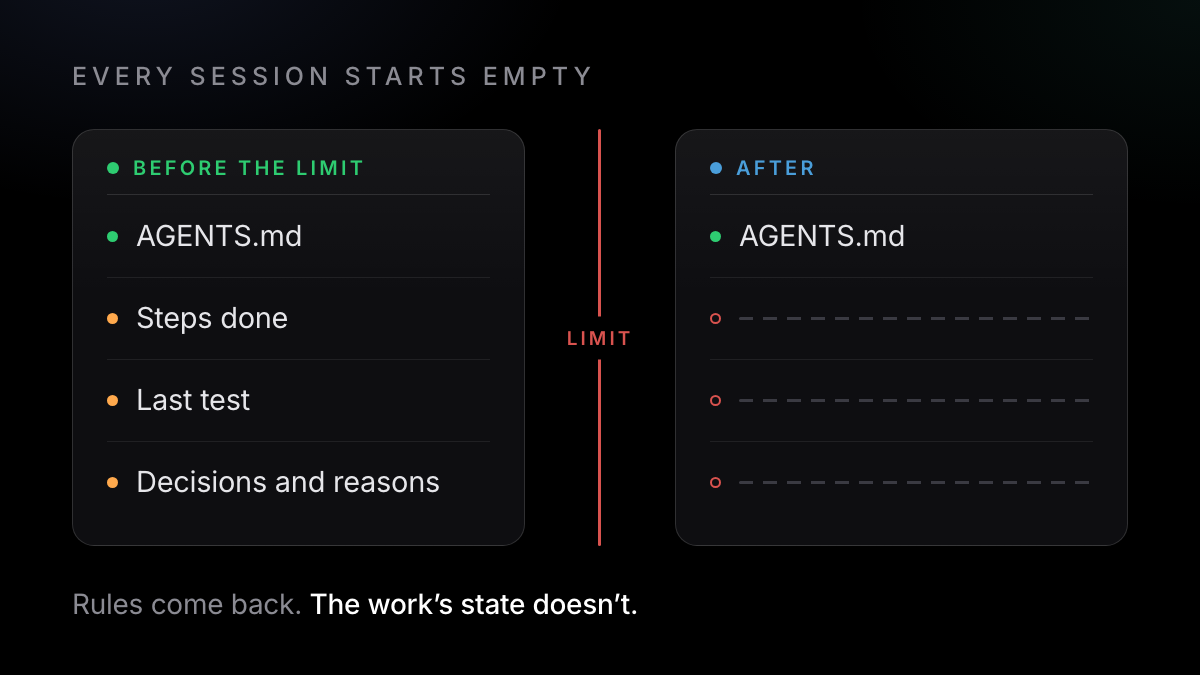
- Every session starts with an empty context window. Claude Code's memory docs say so directly: knowledge crosses sessions only through instruction files (
CLAUDE.mdorAGENTS.md) and the tool's own auto memory, which is machine-local and belongs to that one tool. - Nothing records the state of the work. A resumed session has the transcript, but no checkpoint of which steps are verified done, what the last test run said or what comes next. So the agent re-reads and re-runs to find out, which is exactly the gap the Codex issue asks the tool to close.
- Each tool keeps its own history. Claude Code and Codex save sessions in their own folders and formats. Neither reads the other's conversations unless you import them.
- The instruction files didn't match. Codex and OpenCode read
AGENTS.md. Claude Code read onlyCLAUDE.mduntil version 2.1.277, released in September 2026. - The limit is shared. On Pro and Max plans, Claude and Claude Code draw on the same usage limits, so a busy day in the chat app can end a coding session sooner.
How to fix it today
None of these needs an extra tool.
- Put your rules in one AGENTS.md that all three tools read
Keep build commands, conventions and what not to touch in
AGENTS.mdat the repository root. Codex reads~/.codex/AGENTS.md, then everyAGENTS.mdfrom the Git root down to your working folder, up to 32 KiB by default (Codex docs). OpenCode readsAGENTS.md, and falls back toCLAUDE.md(OpenCode docs). Claude Code (2.1.277 or later) readsAGENTS.mdonly when there's noCLAUDE.md,.claude/CLAUDE.mdorCLAUDE.local.mdin your folder or above it. Check it loaded with/memoryin Claude Code, or in Codex withcodex --ask-for-approval never "Summarize the current instructions.". Claude Code doesn't read anything under.agents/, so shared skills still need their own arrangement. If you keep both files, set Project instructions toclaude-md-and-agents-mdin/config, or start yourCLAUDE.mdwith an import:@AGENTS.md ## Claude Code only Use plan mode for changes under src/billing/. - Keep a checkpoint file, and update it at each milestone
Don't wait for the limit warning; it can land mid-reply. Ask the agent to maintain a file both tools can read, using the fields the Codex issue asked for. After the reset, or in the other tool, start with: "Read CHECKPOINT.md first. Continue from the next action and don't redo anything marked done."
Keep CHECKPOINT.md in the repo root up to date after each step: - Goal of this task, in one line - Steps done (and how each was verified) - Steps left, in order - Files changed so far - Last test or build result - Decisions made, each with its reason - Blockers - The exact next action - In Claude Code, let it wait and continue (2.1.234 or later)
For interactive sessions signed in with a claude.ai subscription, automatic continue is on by default: when the limit stops a task, Claude Code waits in the open session and sends a prompt to pick the task up at the reset. Keep the session open. If the menu appears instead, run
/rate-limit-optionsand pick Wait here, then continue automatically. The switch lives in/configas Continue automatically at usage limit. - Claude Code to Codex: use Codex's /import
In the Codex CLI,
/import(slash commands) brings in Claude Code setup, projects and chats, finding up to 50 chats from the last 30 days. It arrived in Codex CLI 0.145.0 (21 July 2026), and 0.147.0 keeps imported Claude conversations in sync without duplicates. Point Codex at your checkpoint file as well. - Codex to Claude Code: bring the configuration, carry the rest in the checkpoint
Claude Code's
/import codex(add--dry-runto preview) brings Codex configuration: instruction files, MCP servers, commands, subagents and skills. It doesn't bring conversations (command reference), so the checkpoint file does that job. Going the other way to any tool,/exportwrites a Claude Code conversation out as plain text.
What the fix doesn't cover
If the limit lands between updates, the newest work isn't in it. And automatic continue is narrow: per the docs, it ends if you exit, /resume another session or clear the conversation; it isn't offered in background sessions or -p runs; and it doesn't start on its own for a reset more than 24 hours away. The report above says running subagents and workflows don't come back with it.
What reaches the other tool
AGENTS.md, read by all three tools./import brings in Claude Code chats from the last 30 days. Nothing built in brings Codex chats into Claude Code.How Axiom Lift solves it
Axiom Lift is a small helper on your computer that reads the conversations Claude Code, Codex and OpenCode already save, automatically, as you work, so nothing depends on writing a note before the limit hits.
The free fix
- Rules move in
AGENTS.md; the reasoning stays in the transcript where it happened - A checkpoint keeps only what someone thought to write down, as of its last update
- Codex's
/importbrings Claude Code chats one way, from the last 30 days - Automatic continue waits in the open session, for the main conversation only
With Axiom
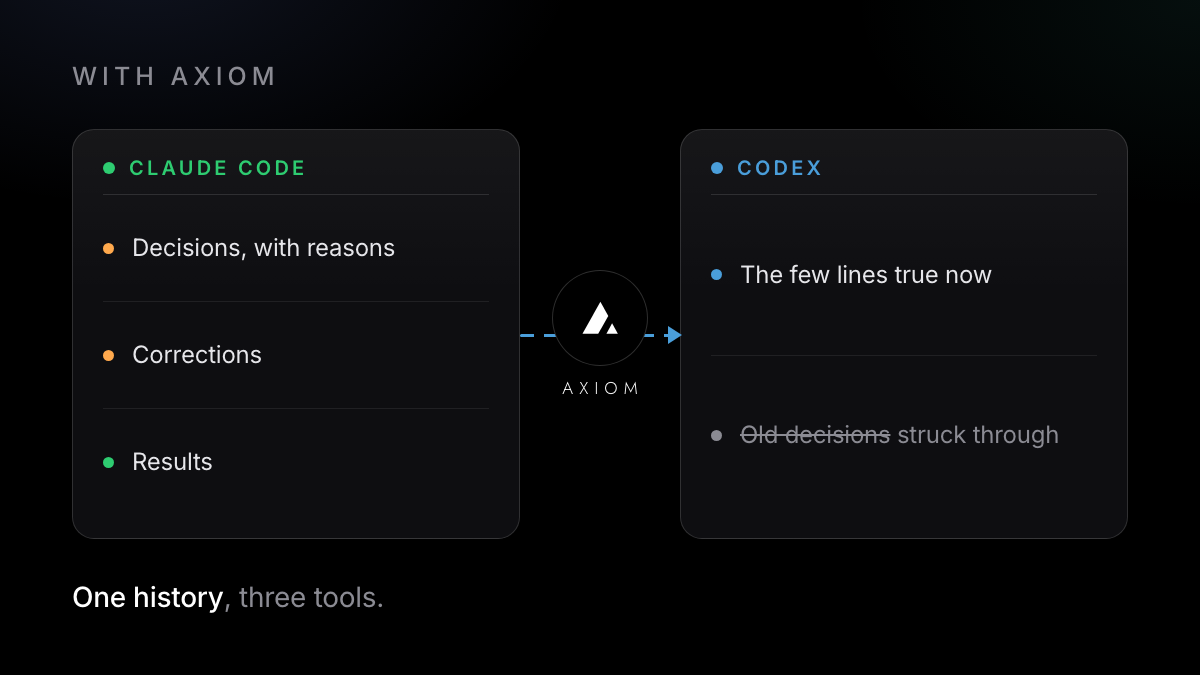
- Picks out the requirements, decisions, corrections and results as you work, and keeps them in one history
- The next session, in the same tool after the reset or in one of the others, asks Axiom over MCP and gets back the few lines that are true now, not the whole transcript
- Before each prompt, adds a few lines about what's already decided on that subject
- If you changed your mind along the way, the old decision is struck through, not erased, and linked to the moment it was said
What it doesn't do here:
- It doesn't give you more usage, and it doesn't resume a paused run or restart subagents that the limit stopped.
- It doesn't move a chat into the other tool's resume list; Codex's
/importdoes that one way. - It covers Claude Code, Codex and OpenCode only. Not Cursor, and not ChatGPT or Claude in a browser.
- It doesn't replace
AGENTS.md. Keep your house rules there.
It installs with one command in a desktop terminal, on Mac, with Linux and Windows in beta (it needs Python 3), and shows you what it found before anything is sent. The free plan covers one computer.
One command in the terminal where you use Claude Code, Codex or OpenCode. Free, no card.
Try it free →Claude, Codex and OpenCode are trademarks of their owners; Axiom works alongside them and is not affiliated.